

DataMagic Technical Column Vol.19
(Introduction Cases) Our company's use cases
Introduction
We will introduce a real case where we have utilized the tips from the DataMagic technical column we have introduced so far. This time, we will introduce an example where we used DataMagic to create data for our sales management and maintenance management.
Background of system construction
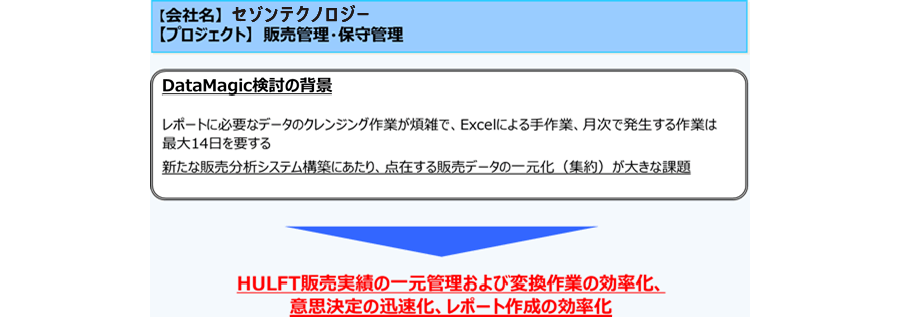
At our company, the data used to create reports for HULFT sales performance analysis and maintenance management was huge and spread across multiple systems, so the person in charge of creating monthly reports to be submitted to corporate planning and sales representatives had to manually cleanse the data required for report creation using Excel, which meant it took up to 14 days to create the reports.In addition, in order to speed up decision-making on sales strategies and other matters, we decided to build a new sales analysis system, but centralizing the scattered sales data was a major issue.
Issues with the current system
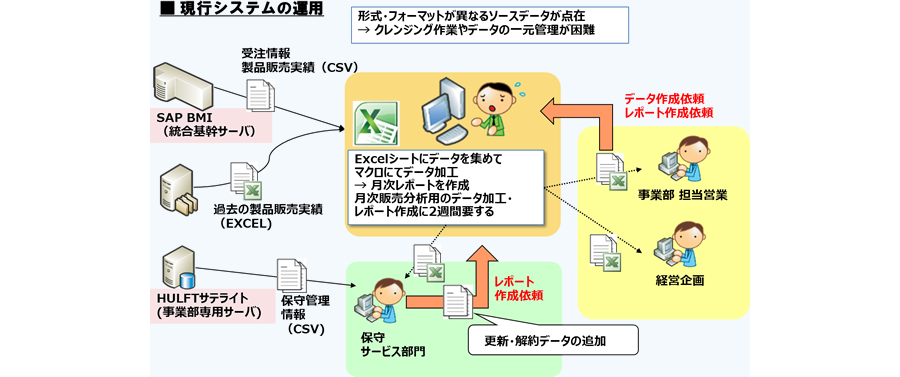
In the current system, to create monthly reports, the person in charge of creating the reports had to use Excel macros to process input data such as order information and sales results from the core server, past sales results from the old sales management system, and maintenance management information from the division's dedicated server.In addition, the corporate planning and sales departments to which the monthly reports are provided frequently request the creation of individual data and reports, but because data creation is done manually, it takes time and is often impossible to respond to.
Overview of the new system
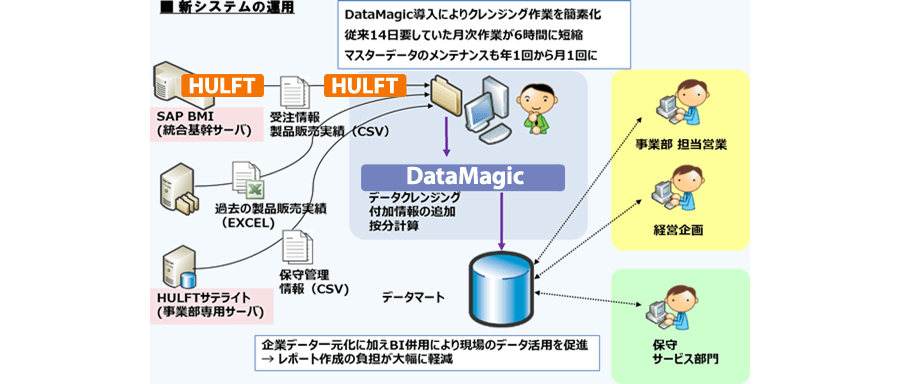
With the new system, DataMagic was used to cleanse data, add additional information, and perform proportional division calculations, reducing the time required to create monthly reports from 14 days to just 6 hours. This freed up the time required by the staff to also reduce the frequency of master data maintenance from once a year to once a month.
Summary: Key points and benefits of implementation
The reasons for deciding to use DataMagic and the benefits of its implementation are listed below.
This time, we introduced a case study of how our company uses DataMagic.
Please download DataMagic trial version and try it out.
- The trial version is free to use for 60 days.
- After you sign up for the trial version, you will receive 90 days of free technical support.
DataMagic Column List
- DataMagic Manager Installation
- "DataMagic" is recommended for its "fast, cheap, and easy" features.
- Vol.1 Character code conversion: EBCDIC⇔Shift_JIS
- Vol.2 Character Code Conversion: External Character Codes
- Vol.3 Character Code Conversion: Unicode (UTF-8)
- Vol.4 Data Conversion: Pack⇔Zone Edition
- Vol.5 (Fixed length ⇒ CSV data conversion)
- Vol.6 (Special Edition) HUB+ DataMagic Collaboration Case Study
- Vol.7 <Distribution BMS ⇒ CSV Conversion>
- Vol.8 <Matching Processing>
- Vol.9 (Full-width⇔Half-width Conversion)
- Vol.10 (DB table data extraction)
- Vol.11 Data Correction
- Vol.12 〈String Replacement〉
- Vol.13 (Special Edition) DataMagic Implementation Case Studies
- Vol.14 (Data sorting and file division)
- Vol.15 Data Collection
- Vol.16 File Merging
- Vol.17 HULFT Definition Bulk Registration
- Vol.18 (Special Edition) HULFT-WebFiletransfer + DataMagic Integration Case Study
- Vol.19 (Introduction Case Studies) Our company's use cases
- Vol.20 Data Masking
- Vol.21 (DB Migration Edition)
- Vol.22 <Common Components: EBCDIC Code Replacement>
- Vol.22 Appendix <Common Component Import and Execution Procedures>
- Vol.23 <Common Components: Date Conversion Function Extension>
- Vol.24 〈Resolving customer requests!: Common components that can process data even if there is invalid data〉