

DataMagic Technical Column Vol.3
Character Code Conversion: Unicode (UTF-8)
Introduction
Unicode is the standard for software that requires internationalization, major operating systems, and programming languages. In reality, Unicode is commonly used in internet-related systems, systems that run on Java/.NET, and systems of companies that operate globally.
However, in traditional business systems, character codes such as JIS, Shift_JIS, EUC, and EBCDIC are mainly used, and it is true that it is difficult to unify them into Unicode.
However, by using DataMagic, it is possible to convert the character codes used in legacy business systems into Unicode, thereby bridging the gap between Japanese codes in various systems.
This TIPS will introduce an example of converting fixed-length data from an IBM mainframe to fixed-length data in Unicode (UTF-8). Note that in order to use this TIPS, DataMagic must be installed on your computer. For information on where to obtain DataMagic and how to install it, please refer to the separate article "Installing DataMagic."

How to operate
Step 1 - Prepare fixed-length data to be converted
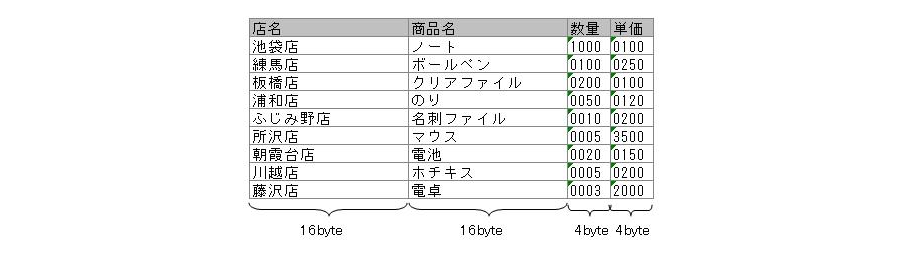
First, prepare the mainframe data. Once the data is ready, save it in the following folder on the PC where DataMagic is installed. This data is the same data used in the first technical column.
C:\work\SAMPLE3\ (saved with the file name "in")
- In this TIPS, we will use fixed-length data in IBM (zOS) character code.
»Download the source data (Note: The sample file is in zip format. Please unzip it before use.)
Step 2 - Download and configure DataMagic script file
To convert IBM mainframe data to Unicode (UTF-8), download the script file below and save it in the folder where DataMagic is installed.
C:\work\SAMPLE3\ (saved as "sample3.igen")
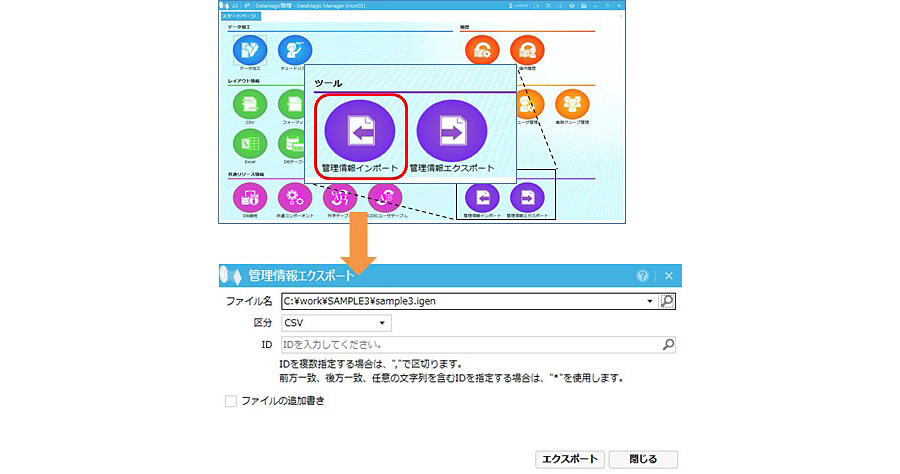
Launch DataMagic management screen and import the downloaded script file into DataMagic. To import, click the [Import Management Information] icon under [Tools] on the start screen. On the Import Management Information screen, specify the downloaded file and click the Import button. If the import is successful, the ID SAMPLE3 will be registered on the data processing information list screen.
»Download the script file (Note: The sample file is in zip format. Please unzip it before use.)
Step 3 - Run DataMagic
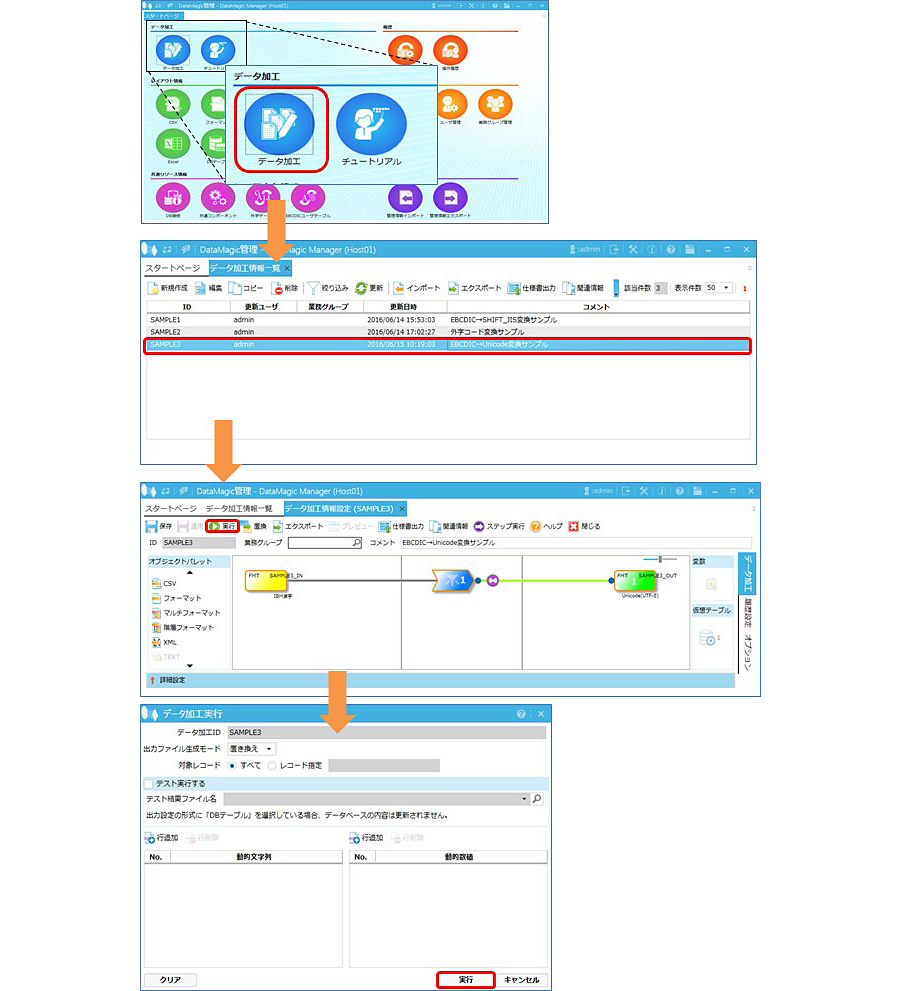
Double-click the data processing information ID SAMPLE3 registered in step 2 and check that the file names for the input and output settings are set correctly. Open the data processing information ID SAMPLE3 from the screen and click the "Execute" button at the top of the screen.
Step 4 - Check the execution results
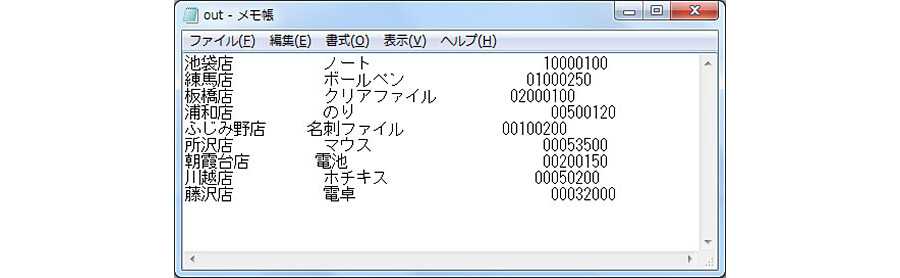
When execution is complete in step 3, a file called "out" will be created in C:\work\SAMPLE3\, which is specified in the output settings. Please check this file using an editor such as Notepad.
lastly
This time we converted IBM mainframe fixed-length data to Unicode (UTF-8). Below are some points to keep in mind when using Unicode (UTF-8) as both the source and destination.
Point 1: Multibyte characters are 3 bytes instead of 2 bytes
Unicode (UTF-8) is a character encoding format that uses 8-bit code units of variable length (1 to 4 bytes), so many characters that were expressed in 2 bytes in IBM mainframes, Shift_JIS, etc. are now expressed in 3 bytes. Therefore, if you use Unicode (UTF-8) as the conversion destination, you must prepare a sufficient item length.
Point 2: Handling character items without shift codes (N type)
In EBCDIC character codes such as those used on IBM mainframes, "shift codes" are used to switch between single-byte and double-byte characters, but DataMagic handles items that do not require this switching with a data attribute called N type. However, as mentioned in Point 1, Unicode (UTF-8) is a variable-length code (1 to 4 bytes), which may be incompatible with N type, which is designed to handle data with an even number of bytes. When converting to Unicode (UTF-8), use M type, which is a mixed kanji and character type.
Point 3: Device-dependent characters
There are differences in how Unicode handles the characters "~", "∥", "-", "¢", "£", and "¬" between Windows and other systems. DataMagic 's code conversion can absorb these differences.
Please download DataMagic trial version and take advantage of future technical columns.
- The trial version is free to use for 60 days.
- After you sign up for the trial version, you will receive 90 days of free technical support.
DataMagic Column List
- DataMagic Manager Installation
- "DataMagic" is recommended for its "fast, cheap, and easy" features.
- Vol.1 Character code conversion: EBCDIC⇔Shift_JIS
- Vol.2 Character Code Conversion: External Character Codes
- Vol.3 Character Code Conversion: Unicode (UTF-8)
- Vol.4 Data Conversion: Pack⇔Zone Edition
- Vol.5 (Fixed length ⇒ CSV data conversion)
- Vol.6 (Special Edition) HUB+ DataMagic Collaboration Case Study
- Vol.7 <Distribution BMS ⇒ CSV Conversion>
- Vol.8 <Matching Processing>
- Vol.9 (Full-width⇔Half-width Conversion)
- Vol.10 (DB table data extraction)
- Vol.11 Data Correction
- Vol.12 〈String Replacement〉
- Vol.13 (Special Edition) DataMagic Implementation Case Studies
- Vol.14 (Data sorting and file division)
- Vol.15 Data Collection
- Vol.16 File Merging
- Vol.17 HULFT Definition Bulk Registration
- Vol.18 (Special Edition) HULFT-WebFiletransfer + DataMagic Integration Case Study
- Vol.19 (Introduction Case Studies) Our company's use cases
- Vol.20 Data Masking
- Vol.21 (DB Migration Edition)
- Vol.22 <Common Components: EBCDIC Code Replacement>
- Vol.22 Appendix <Common Component Import and Execution Procedures>
- Vol.23 <Common Components: Date Conversion Function Extension>
- Vol.24 〈Resolving customer requests!: Common components that can process data even if there is invalid data〉