

DataMagic Technical Column Vol.5
<Fixed length ⇒ CSV data conversion>
Introduction
Mainframes and midrange computers typically handle fixed-length files. For this reason, text files used in business are formatted so that all lines (records) are the same length, and if the length is insufficient, spaces or other characters are used to fill in the gaps. On the other hand, open systems can handle variable-length lines (records), and often use the CSV format, which represents fields within records using delimiters. When linking text data from mainframes or midrange computers to open systems, it is necessary to convert the fixed-length data to CSV data.
DataMagic makes it easy to convert between fixed-length data and CSV data.
This TIPS introduces an example of converting fixed-length data from an IBM mainframe into Shift_JIS CSV data and changing the output destination based on a specific field value. In this example, we will use the "Region Code" field in the input file to allocate the output destination by region. Note that in order to use this TIPS, DataMagic must be installed on your computer. For information on where to obtain DataMagic and how to install it, please refer to the separate article "Installing DataMagic."

How to operate
Step 1 - Prepare fixed-length data to be converted
First, prepare the mainframe data. Once the data is ready, save it in the following folder on the PC where DataMagic is installed.
C:\work\SAMPLE5\ (saved with the file name "in")
- In this TIPS, we will use fixed-length data in IBM (zOS) character code.
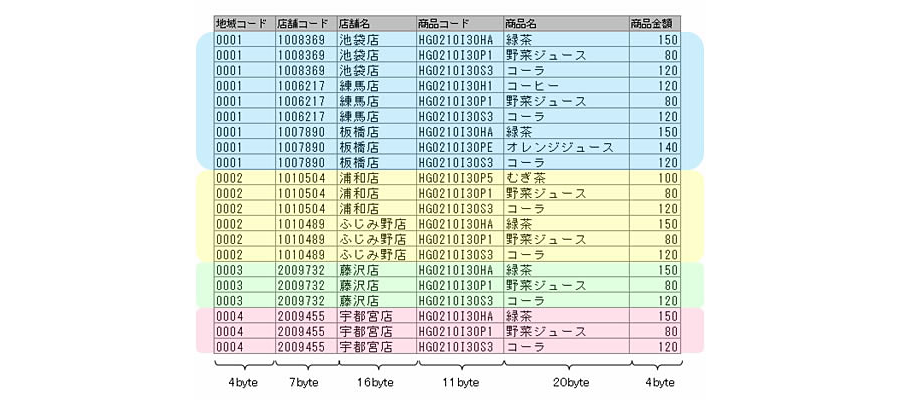
»Download the source data (Note: The sample file is in zip format. Please unzip it before use.)
Step 2 - Download and configure DataMagic script file
To convert fixed-length data from an IBM mainframe to Shift_JIS in CSV format, download the script file below and save it in the folder where DataMagic is installed.
C:\work\SAMPLE5\ (saved as "sample5.igen")
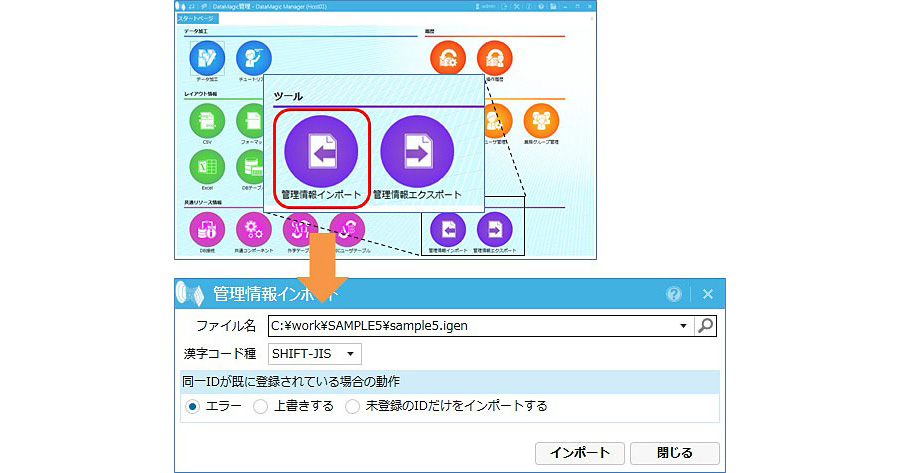
Launch DataMagic management screen and import the downloaded script file into DataMagic. To import, click the [Import Management Information] icon under [Tools] on the start screen. On the Import Management Information screen, specify the downloaded file and click the Import button. If the import is successful, the ID SAMPLE5 will be registered on the Data Processing Information List screen.
»Download the script file (Note: The sample file is in zip format. Please unzip it before use.)
Step 3 - Run DataMagic
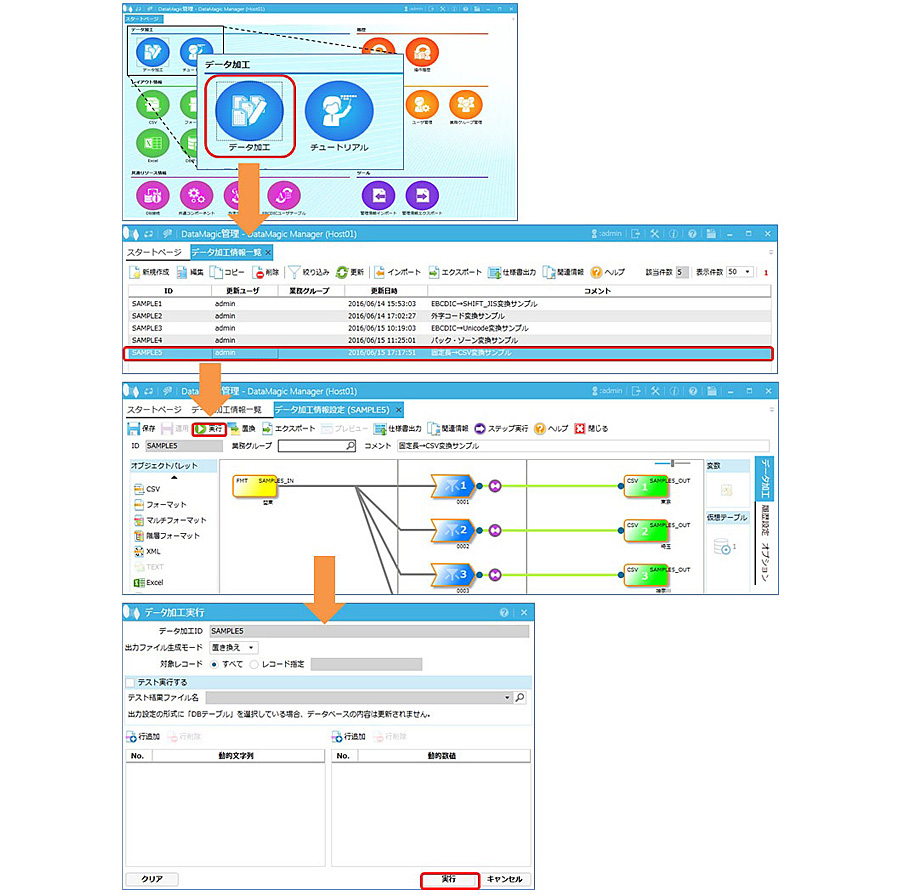
Double-click the data processing information ID SAMPLE5 registered in step 2 and check that the file names for the input and output settings are set correctly. Open the data processing information ID SAMPLE5 from the screen and click the "Execute" button at the top of the screen.
Step 4 - Check the execution results
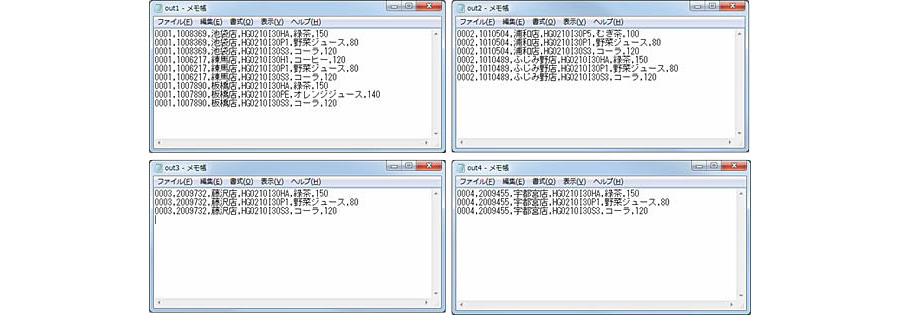
When execution is complete in step 3, four files named "out1" to "out4" will be created in C:\work\SAMPLE5\, which was specified in the output settings. Please check them using an editor such as Notepad.
- The screen below clearly shows the part (product price) that has been converted from pack data to zone data.
lastly
In this article, we converted fixed-length data to CSV data and performed a simple extraction by setting a condition for a single item, "region code." However, this extraction condition can be set by combining multiple conditions using the logical operators AND and OR. By using this condition, you can not only allocate output destinations, but also categorize output content. Please download DataMagic trial version and try out the technical column explanations.
- The trial version is free to use for 60 days.
- After you sign up for the trial version, you will receive 90 days of free technical support.
DataMagic Column List
- DataMagic Manager Installation
- "DataMagic" is recommended for its "fast, cheap, and easy" features.
- Vol.1 Character code conversion: EBCDIC⇔Shift_JIS
- Vol.2 Character Code Conversion: External Character Codes
- Vol.3 Character Code Conversion: Unicode (UTF-8)
- Vol.4 Data Conversion: Pack⇔Zone Edition
- Vol.5 (Fixed length ⇒ CSV data conversion)
- Vol.6 (Special Edition) HUB+ DataMagic Collaboration Case Study
- Vol.7 <Distribution BMS ⇒ CSV Conversion>
- Vol.8 <Matching Processing>
- Vol.9 (Full-width⇔Half-width Conversion)
- Vol.10 (DB table data extraction)
- Vol.11 Data Correction
- Vol.12 〈String Replacement〉
- Vol.13 (Special Edition) DataMagic Implementation Case Studies
- Vol.14 (Data sorting and file division)
- Vol.15 Data Collection
- Vol.16 File Merging
- Vol.17 HULFT Definition Bulk Registration
- Vol.18 (Special Edition) HULFT-WebFiletransfer + DataMagic Integration Case Study
- Vol.19 (Introduction Case Studies) Our company's use cases
- Vol.20 Data Masking
- Vol.21 (DB Migration Edition)
- Vol.22 <Common Components: EBCDIC Code Replacement>
- Vol.22 Appendix <Common Component Import and Execution Procedures>
- Vol.23 <Common Components: Date Conversion Function Extension>
- Vol.24 〈Resolving customer requests!: Common components that can process data even if there is invalid data〉