

DataMagic Technical Column Vol.22
<Common Components: EBCDIC Code Replacement>
Introduction
DataMagic provides common components as a way to modularize data conversion processes. By using common components, you can modularize complex conversion processes and general-purpose processing procedures, improving development efficiency.
In this TIPS, we will introduce a common component that allows you to perform conversion processes that are difficult to perform using existing functions.
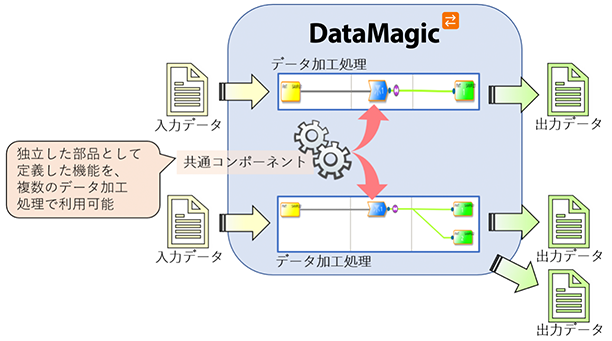
To use this tip, you must have DataMagic installed on your computer. For information on where to get DataMagic and how to install it, please refer to the separate article "Installing DataMagic."
The SAISON_REPLACE_HEX common component introduced in this TIPS can be added to DataMagic Ver.3 or later without updating DataMagic you are currently using.
We also plan to continue expanding our common components based on requests from our customers.
Issues when replacing hexadecimal strings with EBCDIC codes
In data processing, there are many cases where string replacement is required.
DataMagic provides the REPLACE_REG function and the SAISON_REPLACE_REG common component as methods for replacing strings, both of which have the following specifications:
Note
If the input data code type is EBCDIC or JIS, it will be converted to UTF-8 and replaced, so external characters cannot be used. Also, if it contains platform-dependent characters, operation is not guaranteed.
Due to the above specifications, when replacing input kanji character code with hexadecimal strings (\xHH) using EBCDIC-based codes, DataMagic converts the EBCDIC-based codes to UTF-8 before replacing them, so even if you define the replacement search string in EBCDIC-based codes, it will not work correctly.
Replacing EBCDIC codes using SAISON_REPLACE_REG (NG case)
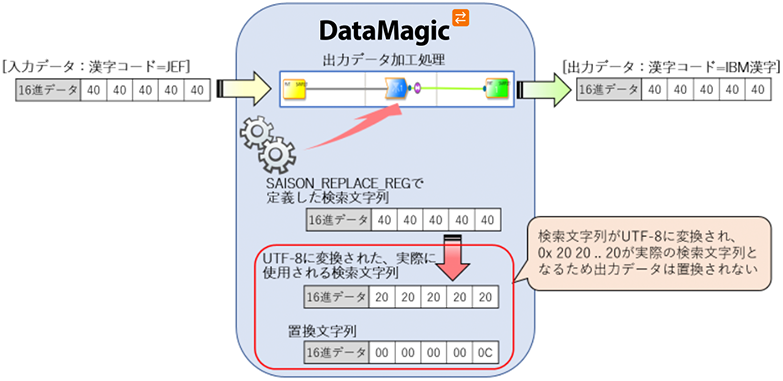
To perform the replacement correctly, you need to convert JEF to UTF-8 data (\x20\x20\x20\x20\x20) and pass it as the search string (argument 1) for SAISON_REPLACE_REG, which is a difficult task.
For this reason, a new common component is used to implement hexadecimal substitution without converting to UTF-8 before substitution.
An example of operation using sample data is explained in the next section, "Checking operation using sample data."
Operation check using sample data
A binary editor is required to check the input and output data, so please prepare one separately.
Step 1 - Prepare the data to be converted and the script file
First, prepare the input data (the "in" file) and the data conversion script file (the "sample22.igen" file). Download sample22.zip from the link below and save it in the following folder on the PC where DataMagic is installed.
C:\work\SAMPLE22\ (Saves “in” and “sample22.igen”)
In this TIPS, we will use fixed-length data of kanji character code JEF as input data.
Binary image of input data

»Download the source data and script files
(Note: The sample file is in zip format. Please unzip it before use.)
Step 2 – Perform data processing
Import the script file obtained in step 1 (the “sample22.igen” file) and execute the added data processing process SAMPLE22.
For the procedures for importing and executing common components, please refer to the separate article "DataMagic Technical Column Vol. 22 Appendix: Procedures for Importing and Executing Common Components."
Step 3 – Check the results
When execution is complete, a file called "out" will be created in the C:\work\SAMPLE22\ directory specified in the output settings. Check the contents using a binary editor.
Binary image of output data

How to use SAISON_REPLACE_HEX
SAISON_REPLACE_HEX introduced in this tip can be used for data processing if you are using DataMagic Ver.3 or later.
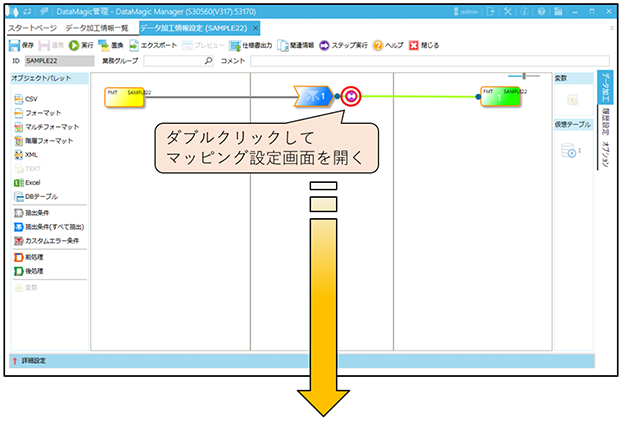
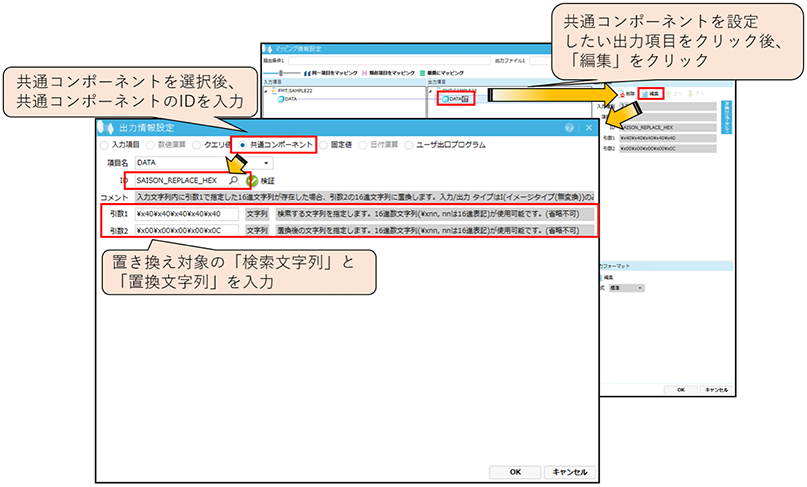
To learn how to use SAISON_REPLACE_HEX, after importing the common components, double-click SAISON_REPLACE_HEX in the common component information list.
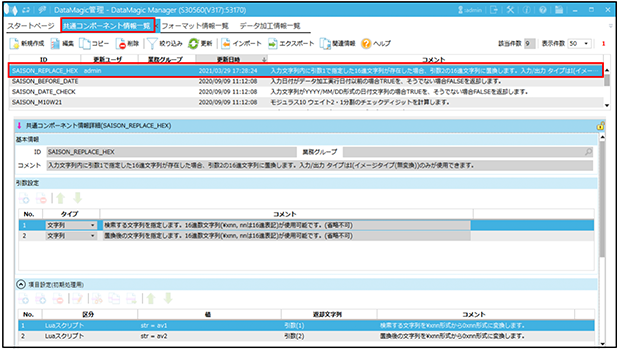
When using common components, please check the explanation in the red box below.
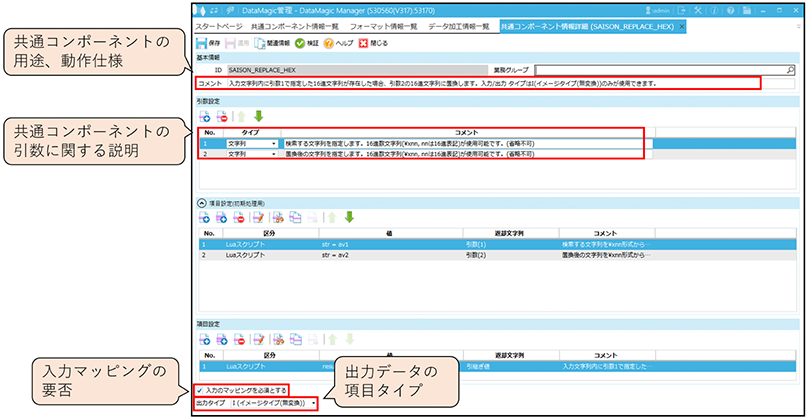
Common components can be set in [Mapping Information Settings] under [Data Processing Information Settings].
lastly
The export file for the SAISON_REPLACE_HEX common component introduced here can be downloaded from the link below. If you would like to add only the common component without using sample22.zip in "3. Operational check using sample data", please use the following.
»Download the export file for the common component "SAISON_REPLACE_HEX"
(Note: The export file will be in zip format. Please unzip it before use.)
If you do not have DataMagic
If you are interested in this product, please download DataMagic evaluation version and try it out.
- The trial version is free to use for 60 days.
- After you sign up for the trial version, you will receive 90 days of free technical support.
DataMagic Column List
- DataMagic Manager Installation
- "DataMagic" is recommended for its "fast, cheap, and easy" features.
- Vol.1 Character code conversion: EBCDIC⇔Shift_JIS
- Vol.2 Character Code Conversion: External Character Codes
- Vol.3 Character Code Conversion: Unicode (UTF-8)
- Vol.4 Data Conversion: Pack⇔Zone Edition
- Vol.5 (Fixed length ⇒ CSV data conversion)
- Vol.6 (Special Edition) HUB+ DataMagic Collaboration Case Study
- Vol.7 <Distribution BMS ⇒ CSV Conversion>
- Vol.8 <Matching Processing>
- Vol.9 (Full-width⇔Half-width Conversion)
- Vol.10 (DB table data extraction)
- Vol.11 Data Correction
- Vol.12 〈String Replacement〉
- Vol.13 (Special Edition) DataMagic Implementation Case Studies
- Vol.14 (Data sorting and file division)
- Vol.15 Data Collection
- Vol.16 File Merging
- Vol.17 HULFT Definition Bulk Registration
- Vol.18 (Special Edition) HULFT-WebFiletransfer + DataMagic Integration Case Study
- Vol.19 (Introduction Case Studies) Our company's use cases
- Vol.20 Data Masking
- Vol.21 (DB Migration Edition)
- Vol.22 <Common Components: EBCDIC Code Replacement>
- Vol.22 Appendix <Common Component Import and Execution Procedures>
- Vol.23 <Common Components: Date Conversion Function Extension>
- Vol.24 〈Resolving customer requests!: Common components that can process data even if there is invalid data〉